3.8 Assets
Contents
- Step 1: Determine which money and investment questions are asked
- Step 2: Provide common money and investment details
- Step 3: Provide other money and investment details
- Step 4: Determine which questions will be asked about other assets
- Step 5: Provide asset information
- Step 6: Selling or giving away assets
- Step 7: Confirm information on the Summary page
Use these instructions to help people answer questions about their assets. This section is only included if the application includes W-2, JAL, Emergency Assistance, or someone who is elderly, blind, or disabled. Once completed, the applicant can review the sections for accuracy before going to the next section.
Step 1: Determine which money and investment questions are asked
These pages ask about the household’s money and investment information. Not everyone in the household will need to provide this information. ACCESS will only ask about household members that need to provide this information for the program they are requesting.
The “Money and investments” page asks who in the household has money or investments.
Show/Hide an example of the pageShow/Hide an example of the page
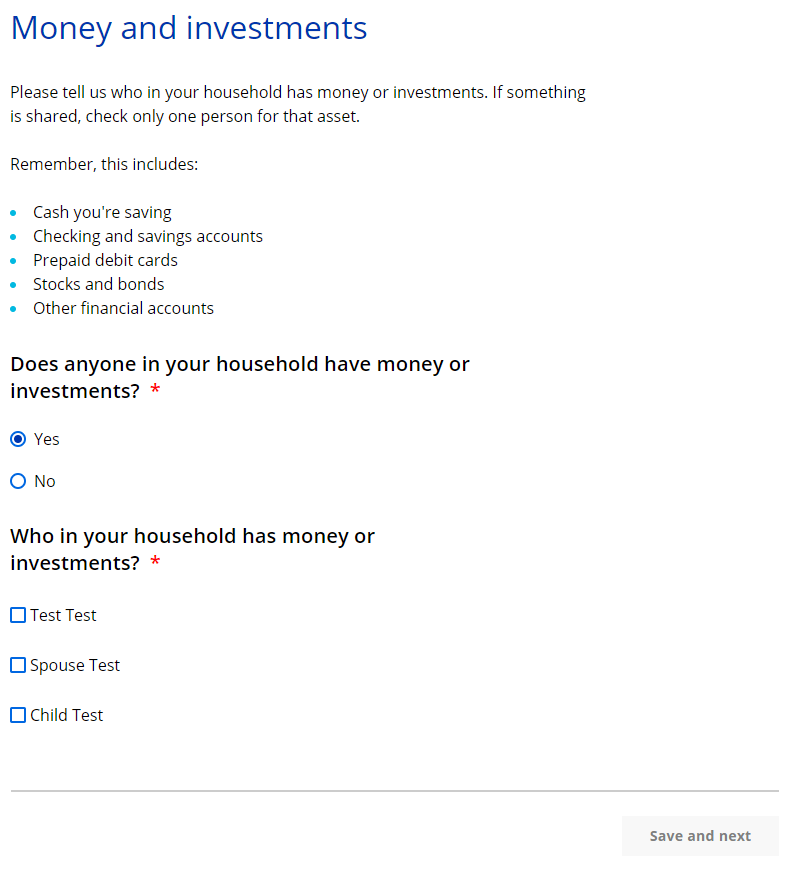
| Questions | How to answer |
| Does anyone in your household have money or investments? |
Select Yes or No. |
|
Who in your household has money or investments?
|
Select the member or members that has money or investments. |
If more than one person in the household has money or investments, the “Your household’s money and investments” page displays. This page asks the applicant to select which member of the household’s money and investments information to enter first. They will return to this page after completing the money and investment information for each person until all are done.
Show/Hide an example of the pageShow/Hide an example of the page
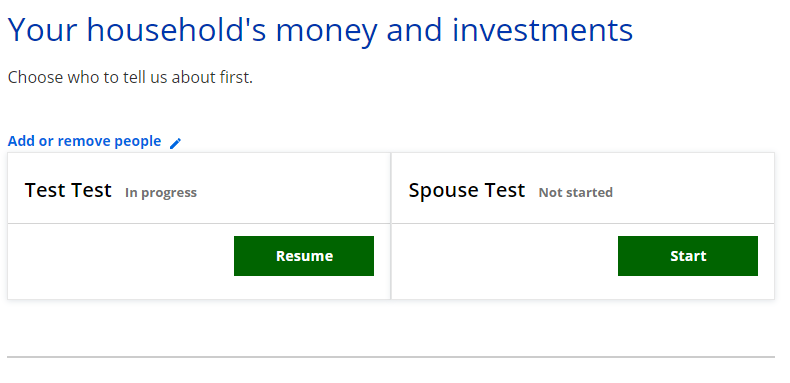
| Questions | How to answer |
| Choose who you’d like to tell us about first. |
Select Start next to someone’s name to begin asking questions for that person. |
The next page the applicant sees depends on the information they provided on this page and earlier pages.
| If the household has... | Continue to... |
| Someone with money and investments | Step 2: Provide common money and investment details |
| No one has money or investments | Step 4: Determine which questions will be asked about other assets |
Step 2: Provide common money and investment details
The “_____’s money” page asks for the most common types of money and investments they may have. ACCESS will show a details page to ask questions about each selection.
Show/Hide an example of the pageShow/Hide an example of the page
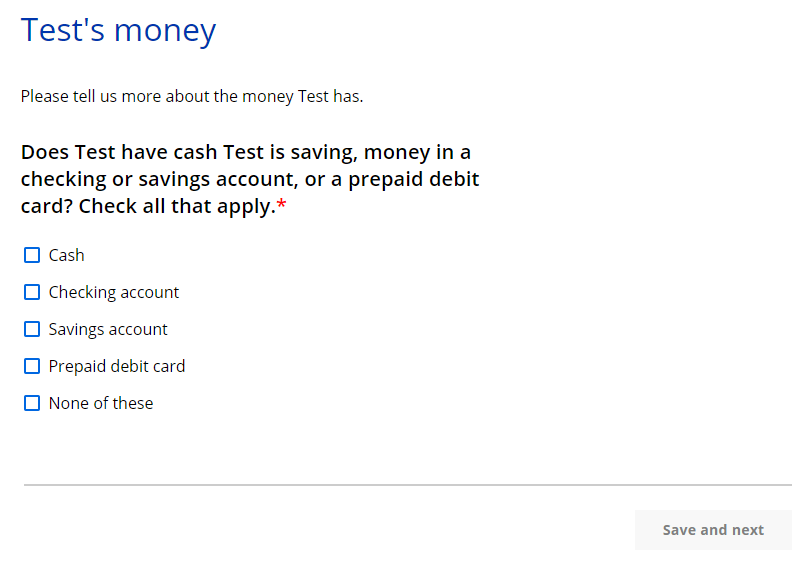
| Questions | How to answer |
| Does _____ have cash _____ is saving, money in a checking or savings account, or a prepaid debit card? Check all that apply. | Select one or more options. |
If they select at least one type of money or investment, a details page displays to ask about the money or investment. There is one details page per type. This page asks about the household member’s cash, checking account, savings account, or prepaid debit card. If the applicant has more than one of each type, enter the information about each one at a time. The page repeats as many times as necessary.
Show/Hide an example of the pageShow/Hide an example of the page
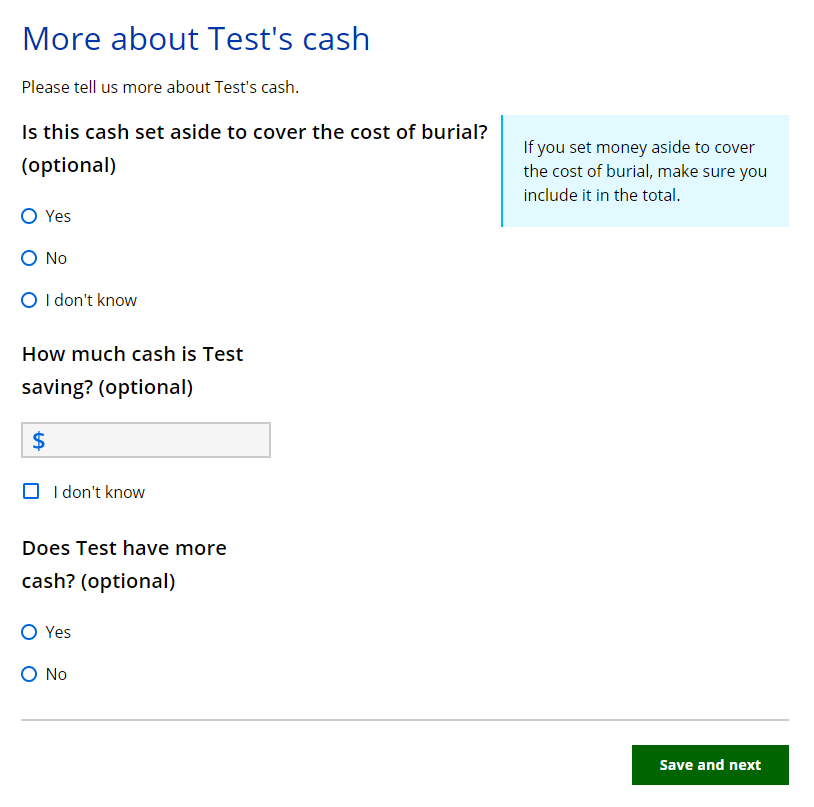
| Questions | How to answer |
| Is this [Money or Investment type] set aside to cover the cost of burial? (Optional) |
Select Yes, No, or I don’t know. |
|
How much cash is _____ saving? (Optional)
|
This question displays if the page is for cash. |
|
How much money is in _____’s [checking account/savings account]? (Optional)
|
This question displays if the page is for a checking or savings account. Enter the amount. The applicant may also select I don’t know. |
|
How much money is on _____’s prepaid debit card? (Optional)
|
This question displays if the page is for a prepaid debit card. Enter the amount. The applicant may also select I don’t know. |
| Please tell us more about the financial institution that owns the [Money or Investment type]. (Optional) | This question displays if the page is for a checking account, savings account, or prepaid debit card. Enter the financial institution name, the full address, and the account number. |
| Does _____ own this account with someone else? (Optional) | Select Yes or No. If the applicant selects yes, the next question displays. |
|
Who does _____ own this account with? Select up to two people. (Optional)
|
Select the member or members that share this account. The applicant may also select Someone else. If the applicant selects this, the next question displays. |
|
Other owner’s name (Optional)
|
Enter the first and last name of the other owner. |
| Does _____ have another [Money or Investment type]? (Optional) | This question displays if the page is for a checking account, savings account, or prepaid debit card. Select Yes or No. If the applicant selects yes, this page will repeat for the same type of money and investment. |
| Does _____ have more cash? (Optional) | This question displays if the page is for cash. Select Yes or No. If the applicant selects yes, this page will repeat for the same type of money and investment. |
Step 3: Provide other money and investment details
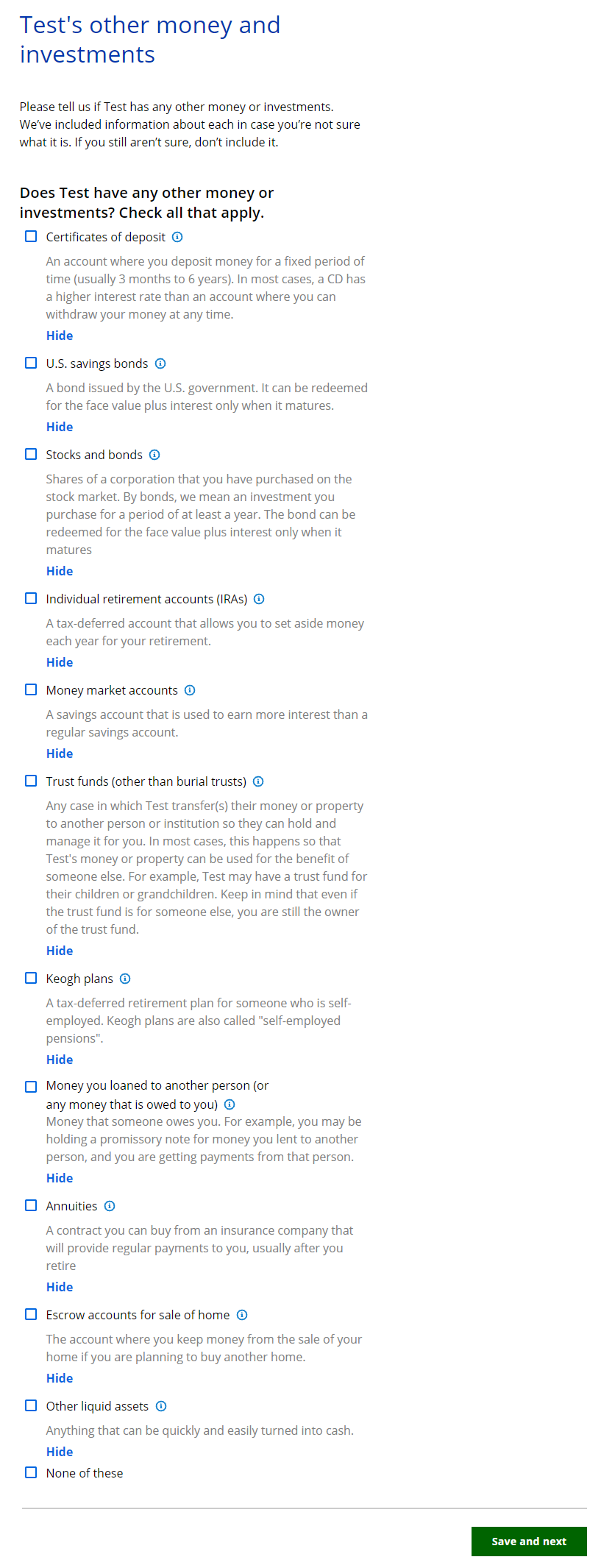
The “_____’s other money and investments” page asks if the individual has any less common types of money or investments.
Show/Hide an example of the pageShow/Hide an example of the page
| Questions | How to answer |
| Does _____ have any other money or investments? Check all that apply. |
Select the other money or investments they have. |
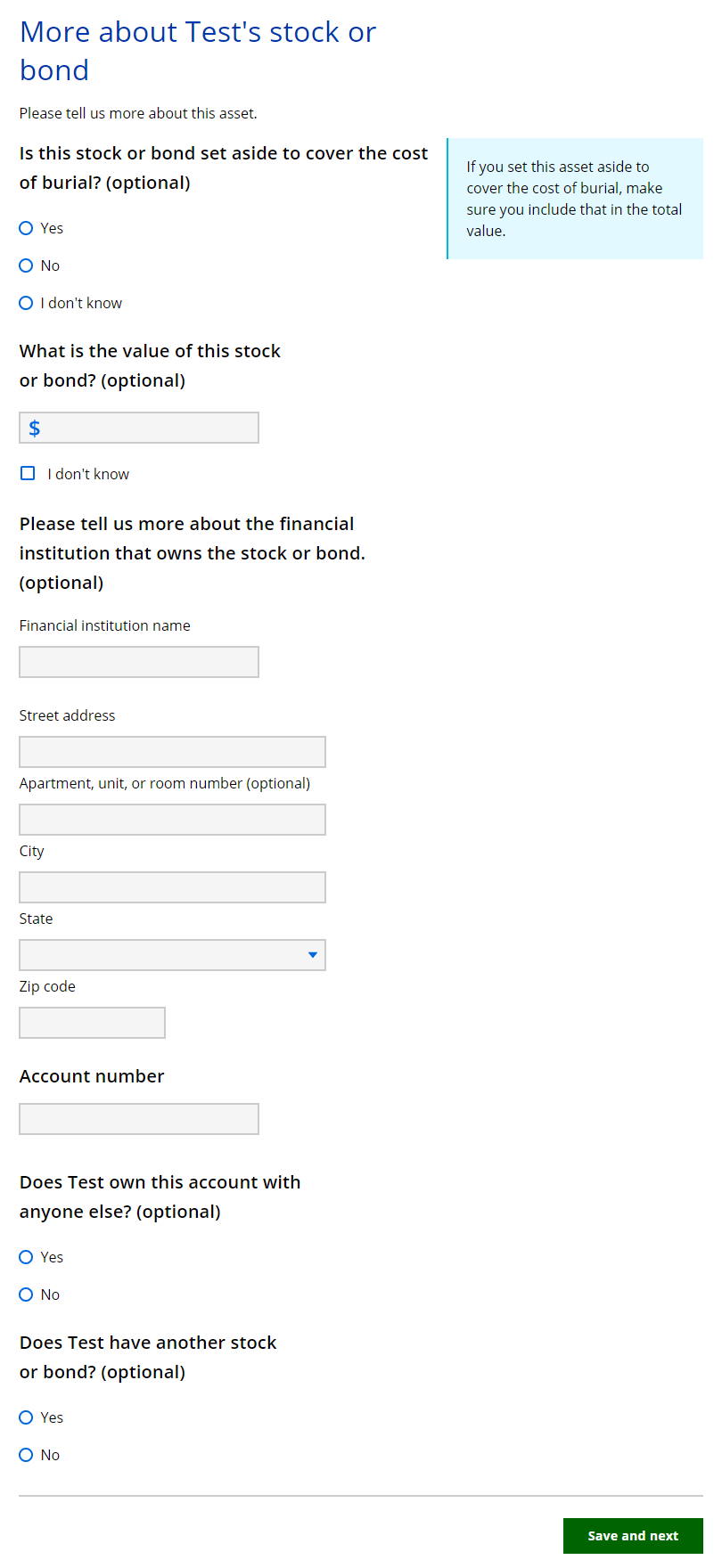
If they select at least one type of other money or investment a details page displays to ask about the other money or investment. There is one details page per type. This page asks about the less common money and investments owned the household member. If the applicant has more than one of each type, enter the information about each one at a time. The page repeats as many times as necessary.
Show/Hide an example of the pageShow/Hide an example of the page
| Questions | How to answer |
| Is this [other money or investment type] set aside to cover the cost of burial? (Optional) |
Select Yes, No, or I don’t know. |
| What is the value of this [other money or investment type]? (Optional) |
Enter the amount. |
| Please tell us more about the financial institutions that owns the [other money or investment type]. (Optional) | Enter the financial institution name, the full address, and the account number. |
| Does _____ own this asset with anyone else? (Optional) | Select Yes, No, or I don’t know. If the applicant selects yes, the next question displays. |
|
Who does _____ own this asset with? Select up to two people. (Optional)
|
Select the member or members that share this account. |
|
Other owner’s name (Optional)
|
Enter the first and last name of the other owner. |
| Does _____ have more money they loaned to another person? (Optional) |
This question displays if the page is for money loaned to another person. |
| Does _____ have another stock or bond? (Optional) |
This question displays if the page is for a stock or bond. |
| Does _____ have another [other money type]? (Optional) |
This question displays if the page is for any other type of money or investment. |
Step 4: Determine which questions will be asked about other assets
These pages ask about the household’s money and investment information. Not everyone in the household will need to provide this information. ACCESS will only ask about household members that need to provide this information for the program they are requesting.
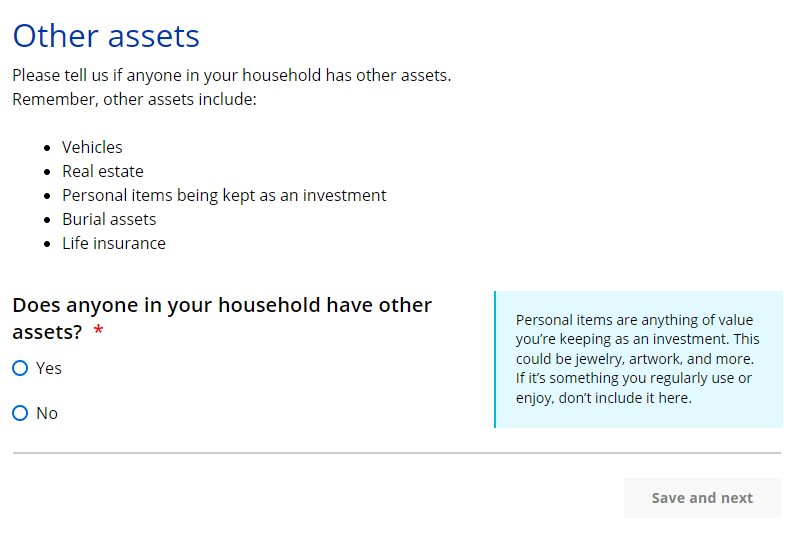
The “Other assets” page asks who in the household has other assets.
Show/Hide an example of the pageShow/Hide an example of the page
| Questions | How to answer |
| Does anyone in your household have other assets? |
Select Yes or No. We only want to know about personal items that you plan to sell. If the applicant selects yes, the next question displays. |
|
Who has other assets? (Optional)
|
Select the member or members that has other assets. Only household members that may need to provide this information will be listed. |
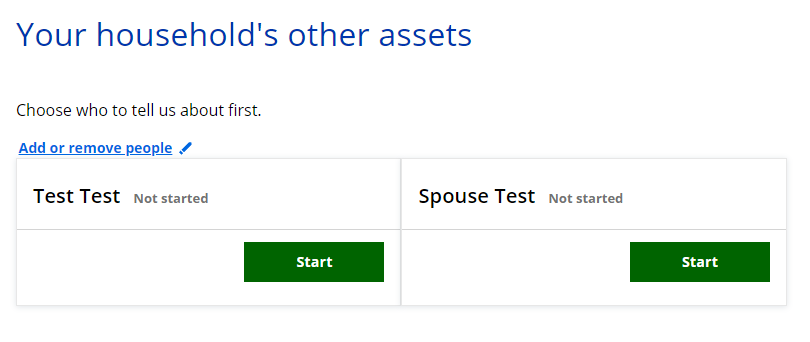
If more than one person in the household has other assets, the “Your household’s other assets” page displays. This page asks the applicant to select which member of the household’s other assets information to enter first. They will return to this page after completing the other assets information for each person until all are done.
Show/Hide an example of the pageShow/Hide an example of the page
| Questions | How to answer |
| Choose who you’d like to tell us about first. |
Select Start next to someone’s name to begin asking questions for that person. |
The next page the applicant sees depends on the information they provided on this page and earlier pages.
| If the household has... | And the application... | Continue to... |
| Someone with other assets | Is for any program | Step 5: Provide asset information |
| No one with other assets, and includes someone over 19 years old who is elderly, blind or disabled | Includes health care | Step 6: Selling or giving away assets |
| Does not include health care | Step 7: Confirm information on the Summary page | |
| No one with other assets, and doesn’t include someone over 19 years old who is elderly, blind or disabled | Is for any program | Step 7: Confirm information on the Summary page |
Step 5: Provide asset information
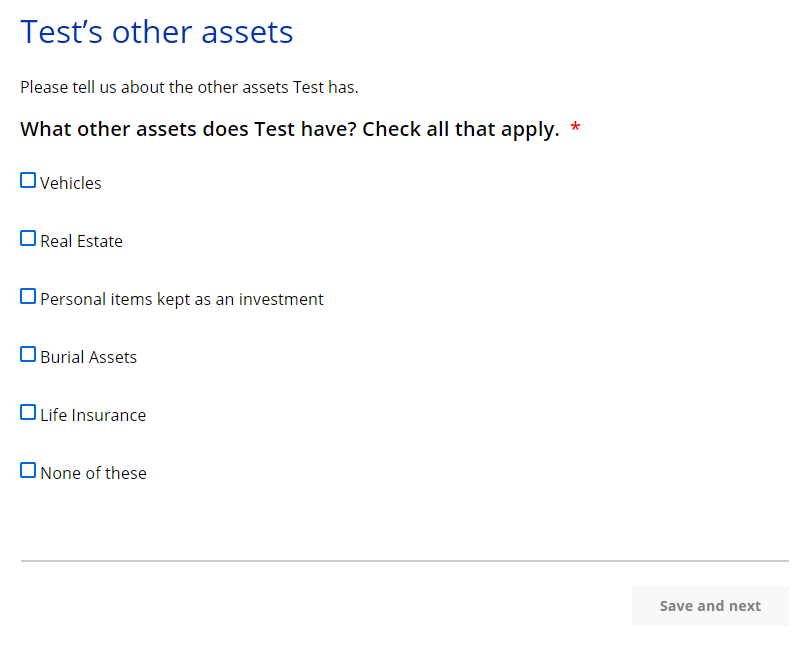
The “_____’s other assets” page asks for the what types of other assets the household member has. ACCESS will show a details page to ask questions about each selection.
Show/Hide an example of the pageShow/Hide an example of the page
| Questions | How to answer |
| What other assets does _____ have? Check all that apply. |
Select one or more options. |
There are several pages that may appear based on the types of other assets selected. These pages will repeat for each type of asset until all information is entered. If the household member has more than one type of the same asset, enter the information for one at a time. The pages will repeat as many times as necessary.
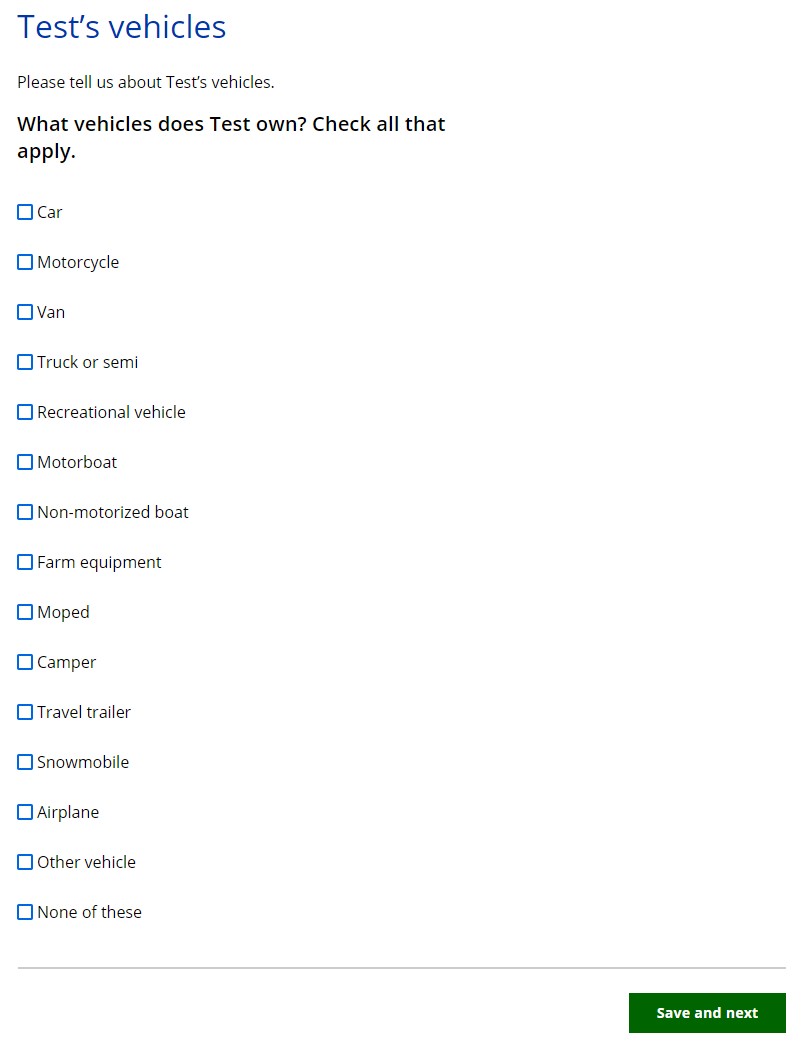
This page asks what type of vehicle they own.
Show/Hide an example of the pageShow/Hide an example of the page
| Questions | How to answer |
| What vehicle does _____ own? Check all that apply. |
Select the vehicle or vehicles the individual owns. The applicant may also select None of these. |
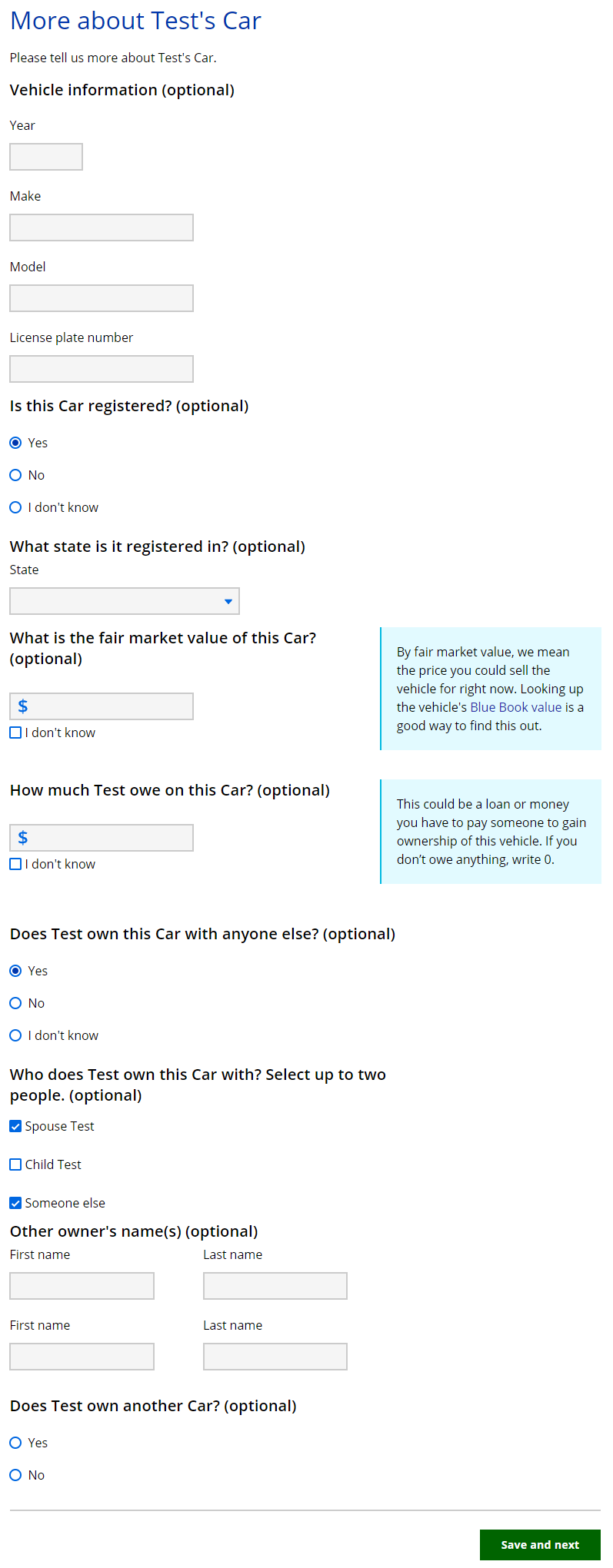
If they select at least one type of vehicle, a details page displays to ask about the vehicle. It repeats for each type of vehicle selected. If they have more than one type of the same vehicle, answer about one at a time.
Show/Hide an example of the pageShow/Hide an example of the page
| Questions | How to answer |
| Vehicle information (Optional) |
Enter the year, make, model and license plate number. |
| Is this [vehicle type] registered? (Optional) |
Select Yes, No, or I don’t know. |
|
What state is it registered in? (Optional)
|
Select the state from the dropdown list. |
| What is the fair market value of this [vehicle type]? (Optional) |
Enter the fair market value of the vehicle. |
| How much does _____ owe on this [vehicle type]? (Optional) |
Enter the amount owed for this vehicle. If you don’t owe anything, write 0. |
| Does _____ own this [vehicle] with anyone else? (Optional) |
Select Yes, No, or I don’t know. |
|
Who does _____ own this [vehicle type] with? Select up to two people. (Optional)
|
Select the member or members who also own this vehicle. |
|
Other owner’s name(s) (Optional)
|
Enter the first and last name of the other owner or owners. |
| Does _____ own another [vehicle type]? (Optional) |
Select Yes or No. |
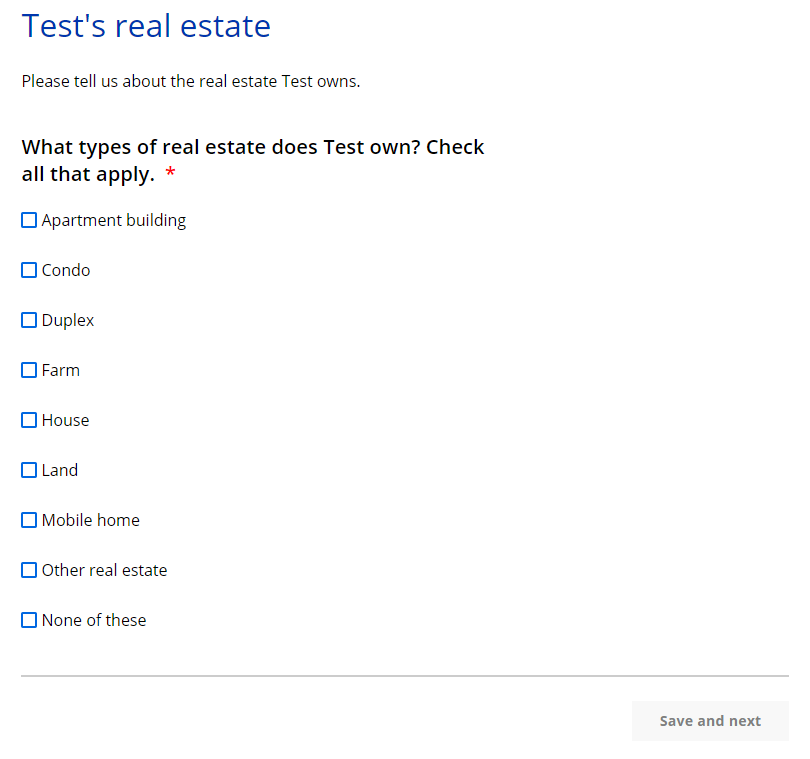
The “_____’s real estate” page asks about the type of real estate the household member owns.
Show/Hide an example of the pageShow/Hide an example of the page
| Questions | How to answer |
| What types of real estate does _____ own? Check all that apply. |
Select the real estate type or types the individual owns. The applicant may also select None of these. |
If they select at least one type of real estate, a details page displays to ask about the real estate type. It repeats for each type of real estate selected. If they have more than one type of the same real estate, answer about one at a time.
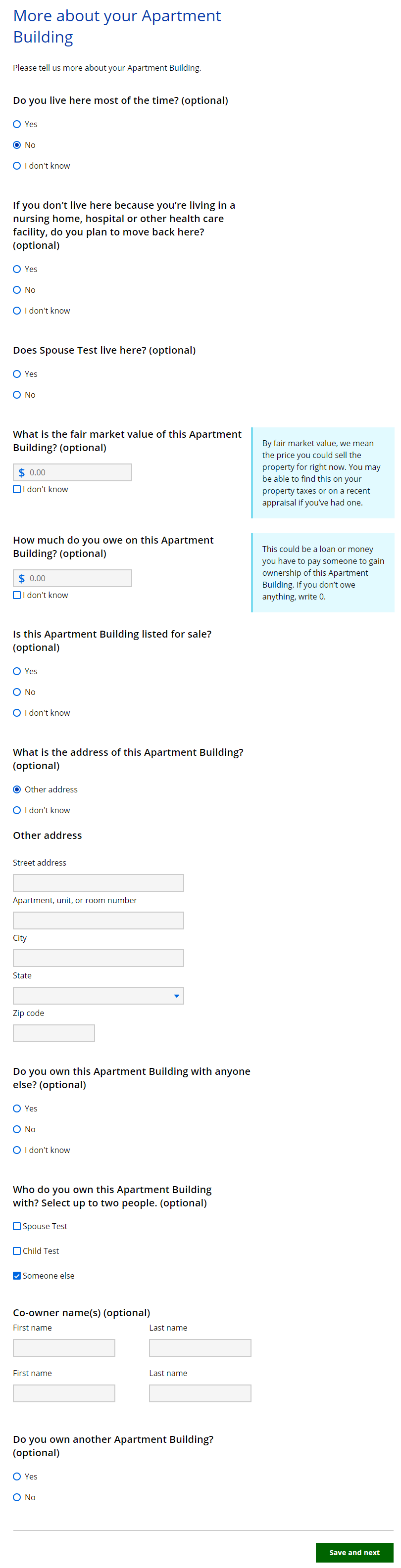
Show/Hide an example of the pageShow/Hide an example of the page
| Questions | How to answer |
| Does _____ live here most of the time? (Optional) |
Select Yes, No, or I don’t know. |
|
If _____ doesn’t live here because they’re living in a nursing home, hospital or other health care facility, do they plan to move back here? (Optional)
|
Select Yes, No, or I don’t know. This question helps determine if this real estate is still considered their primary residence even if they are not currently living there. |
| Does [spouse name] live here? (Optional) |
This question displays if the person is married, separated or legally separated and their spouse is in the household AND their spouse is not living in an institution. |
| What is the fair market value of this [real estate]? (Optional) |
Enter the fair market value. |
| How much does _____ owe on this [real estate]? (Optional) |
This question displays if the real estate is not the applicant’s or their spouse’s current residence, and they don’t plan to move back there from an institution. |
| Is this [real estate] listed for sale? (Optional) |
This question displays if the real estate is not the applicant’s or their spouse’s current residence, and they do not plan to move back there from an institution. |
| What is the address of this [real estate]? (Optional) |
Select the address from the checklist. Each address previously entered in the application will be listed, as well as an option to list a new one. |
|
Other address
|
Enter the full address. |
| Does _____ own this [real estate] with anyone else? (Optional) |
Select Yes, No, or I don’t know. |
|
Who does _____own this [real estate] with? Select up to two people. (Optional)
|
Select the member or members who also own this real estate. The applicant may also select Someone else. If the applicant selects this, the next question displays. |
|
Co-owner name(s) (Optional)
|
Enter the first and last name of the other owner or owners. |
| Does _____ own another [real estate]? (Optional) | Select Yes or No. If the applicant answers yes, this page will repeat for the same type of real estate. |
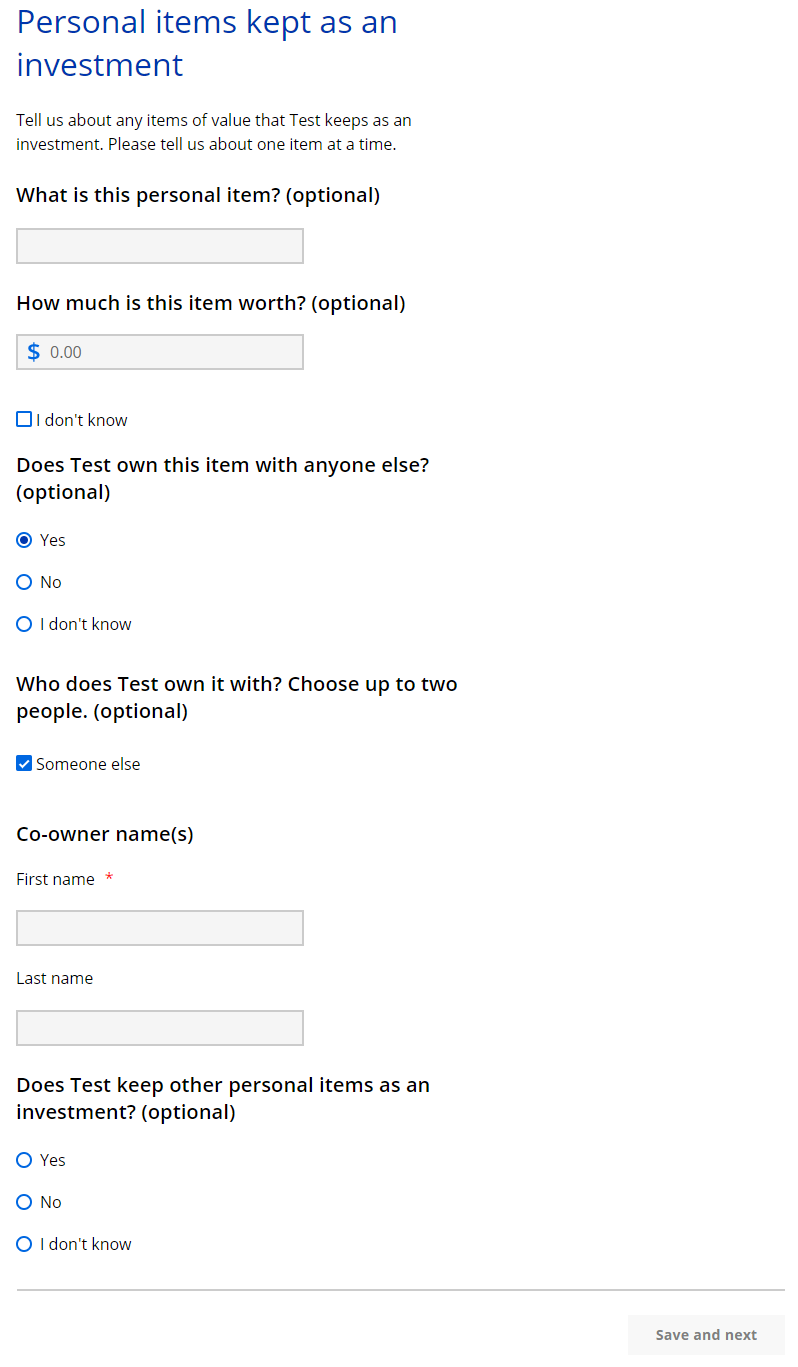
The “Personal items kept as an investment” page asks about personal items the household member is keeping as an investment or plans to sell. It repeats for each type of personal item selected. If they have more than one type of personal item, answer about one at a time.
Show/Hide an example of the pageShow/Hide an example of the page
| Questions | How to answer |
| What is this personal item? |
Enter the description of the item they intend to sell. |
| How much is this item worth? | Enter how much the item is worth. The applicant may also select I don’t know. |
| Does _____ own this item with anyone else? (Optional) |
Select Yes, No, or I don’t know. |
|
Who does _____ own it with? Choose up to two people. (Optional)
|
Select the member or members who also own this real estate. |
|
Co-owner name(s) (Optional)
|
Enter the first and last name of the other owner or owners. |
| Does _____ keep other personal items as an investment? (Optional) |
Select Yes or No. |
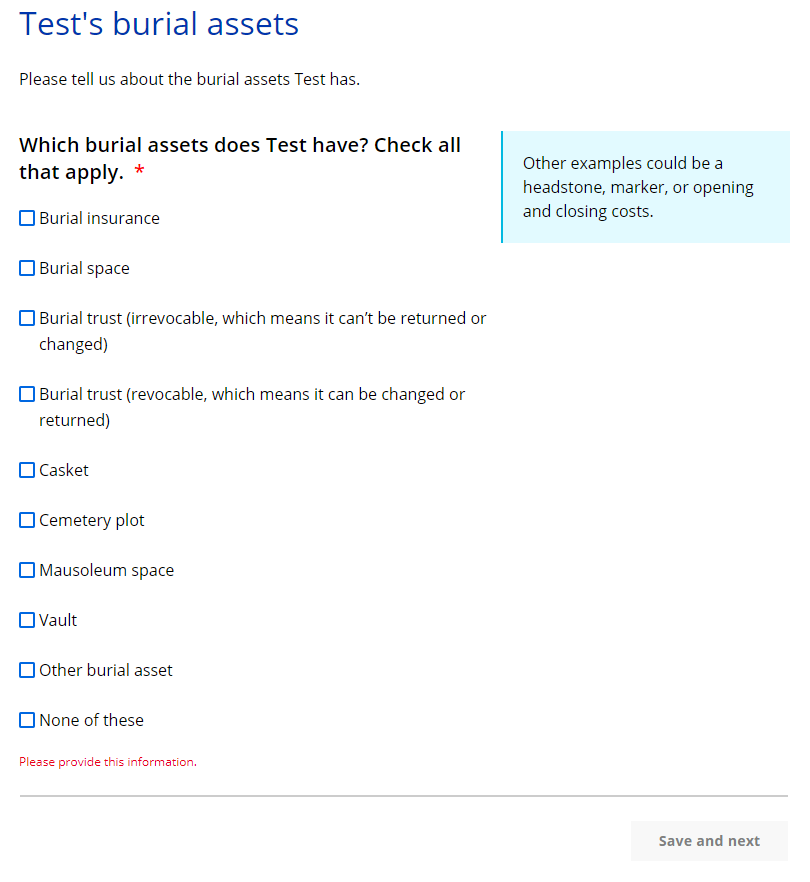
This page asks what type of burial assets they own.
Show/Hide an example of the pageShow/Hide an example of the page
| Questions | How to answer |
| Which burial assets does_____ have? Check all that apply. |
Select the burial asset type or types the individual owns. |
Show/Hide an example of the pageShow/Hide an example of the page
| Questions | How to answer |
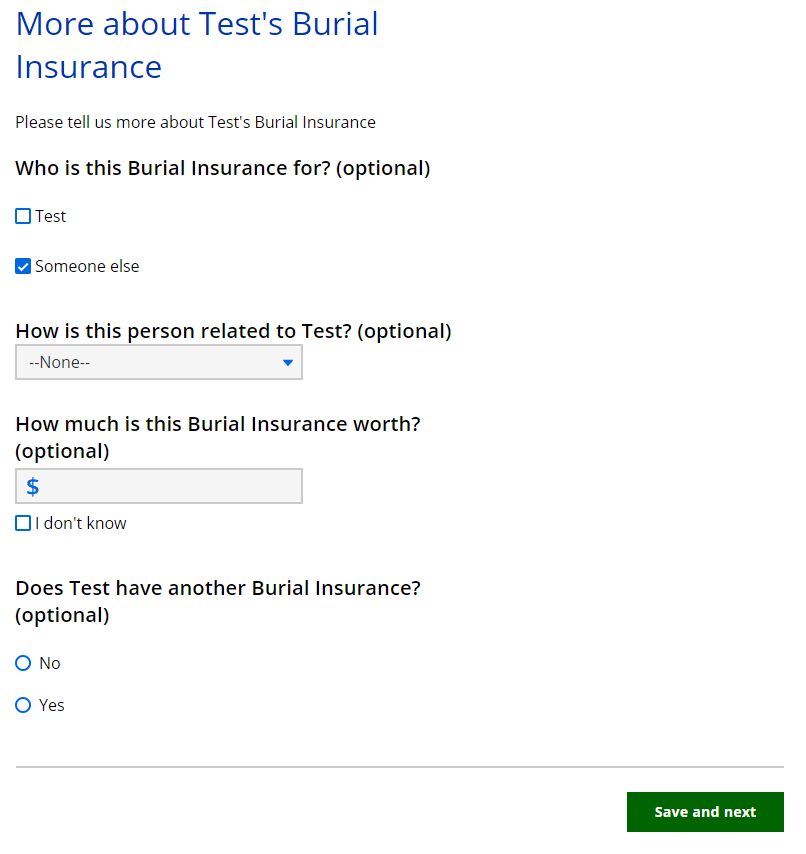
| Who is this [burial asset] for? (Optional) |
Select the member who this is for.The applicant may also select Someone else. If the applicant selects this, the next question displays. |
|
How is this person related to _____? (Optional)
|
Select the relationship of the household member to this other person from the dropdown menu. |
| How much is this [burial asset] worth? (Optional) |
Enter how much the burial asset is worth. |
| Does _____ have another [burial asset]? (Optional) |
Select Yes or No. If the applicant selects yes, this page will repeat for the same type of burial asset. |
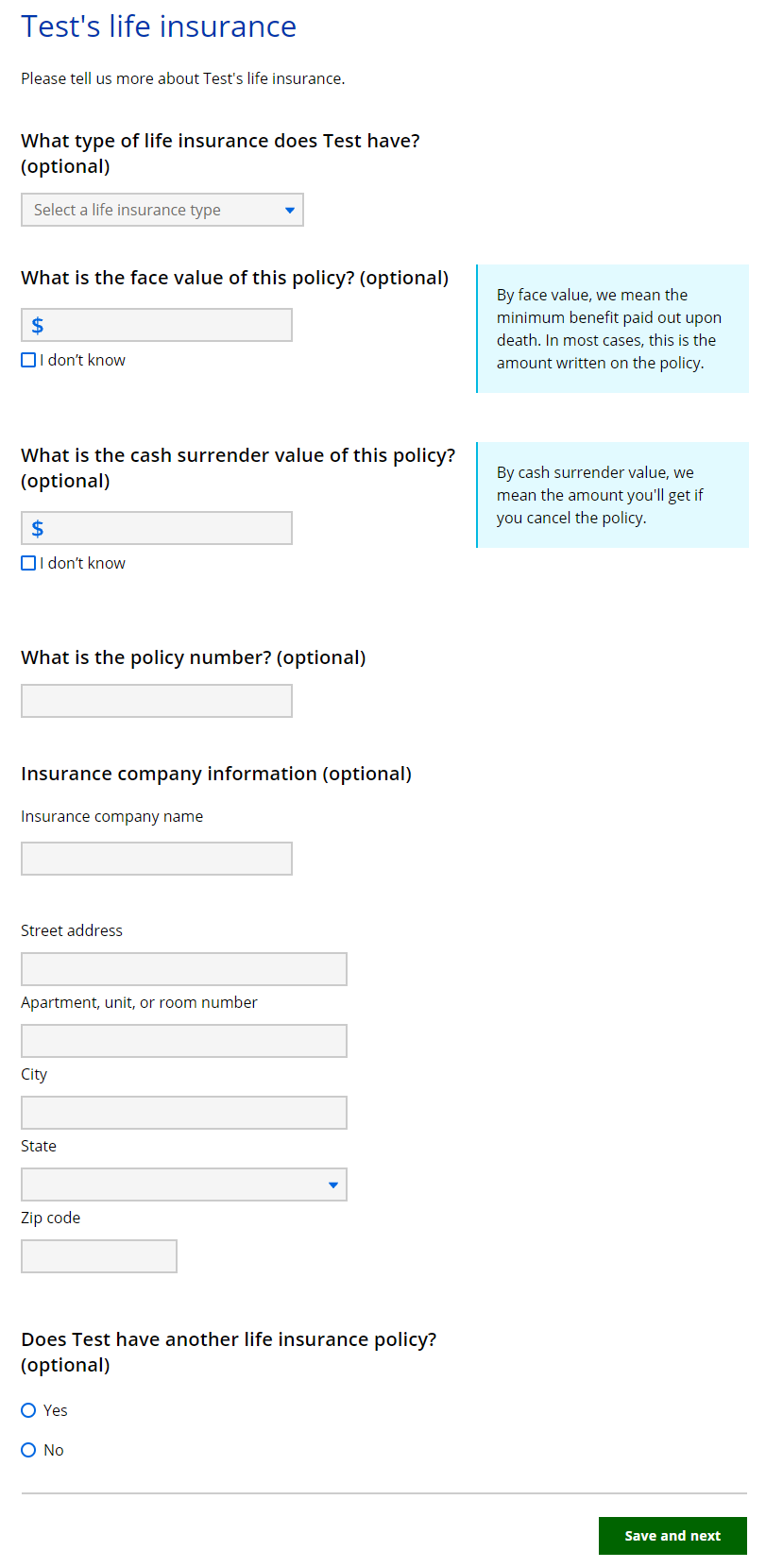
The “_____’s life insurance” page asks about the household member’s life insurance policy.
Show/Hide an example of the pageShow/Hide an example of the page
| Questions | How to answer |
| What type of life insurance does _____ have? (Optional) |
Select the policy type from the dropdown menu. |
| What is the face value of this policy? (Optional) |
Enter the face value of this policy. |
| What is the cash surrender value of this policy? (Optional) |
Enter the cash surrender value of this policy. |
| What is the policy number? (Optional) | Enter the policy number. |
| Insurance company information (Optional) | Enter the name and full address of the insurance company. |
| Does _____ have another life insurance policy? (Optional) | Select Yes or No. If the applicant answers yes, this page will repeat. |
The next page the applicant sees depends on if the applicant is applying for health care.
| If the household includes... | And the application... | Continue to... |
| Someone over 19 years old who is elderly, blind or disabled | Includes health care | Step 6: Selling or giving away assets |
| Does not include health care | Step 7: Confirm information on the Summary page | |
| No one over 19 years old who is elderly, blind or disabled | Is for any program | Step 7: Confirm information on the Summary page |
Step 6: Selling or giving away assets
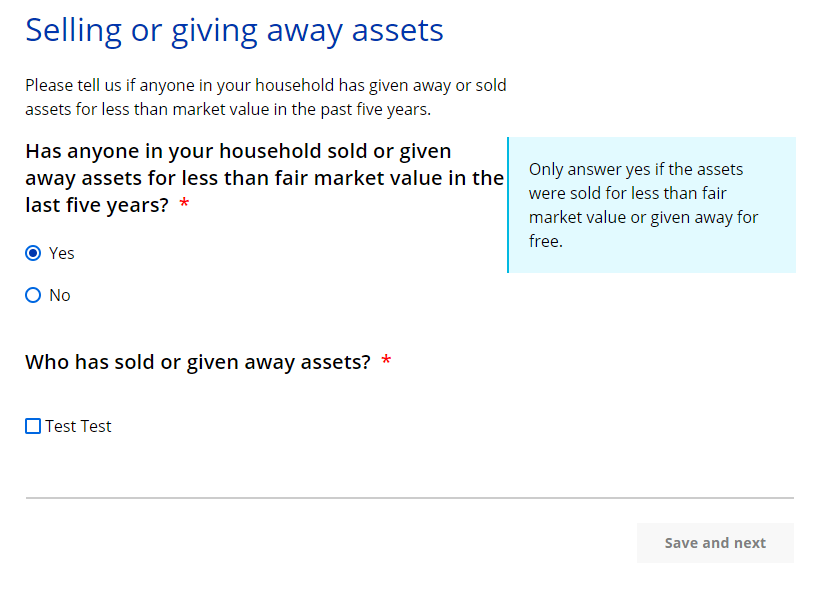
This page asks if an elderly, blind, or disabled household member over 19 years old has sold or given away assets in the past five years.
Show/Hide an example of the pageShow/Hide an example of the page
| Questions | How to answer |
| Has anyone in your household sold or given away assets for less than market value in the last five years? |
Select Yes or No. |
|
Who has sold or given away assets?
|
Select the member or members that have sold or given away assets. Only household members that may need to provide this information will be listed. |
Step 7: Confirm information on the Summary page
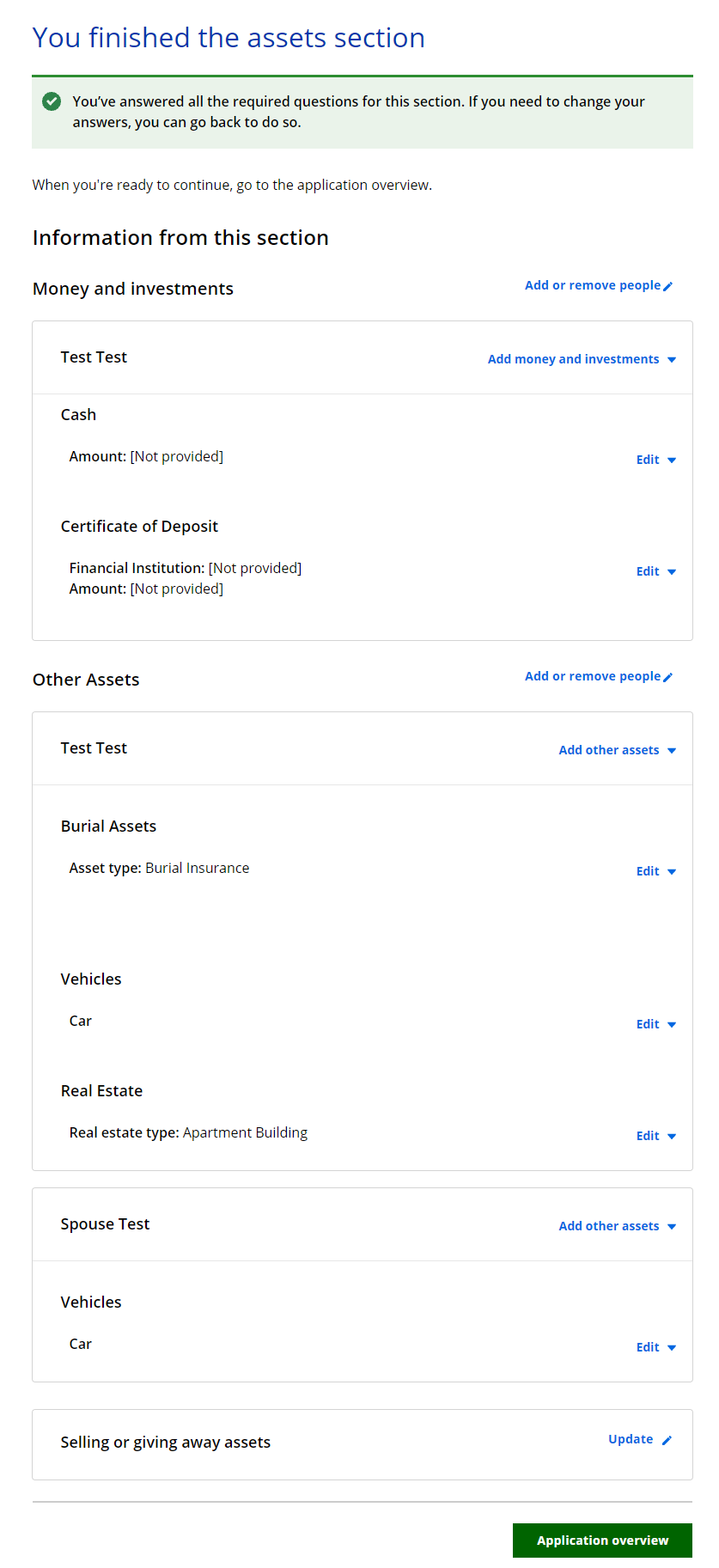
Once completed, a summary page displays. Here, the applicant can review the sections for accuracy before going to the next section.
Show/Hide an example of the pageShow/Hide an example of the page
This page last updated in Release Number: 21-02
Release Date: 12/13/2021
Effective Date: 12/13/2021