12.3 Becoming an Express Enrollment User
Organizations enroll as an Express Enrollment partner, provider, or qualified hospital by applying through the ForwardHealth Portal. Go to the Provider Enrollment Information page on the ForwardHealth Portal for information on enrolling to be an Express Enrollment partner, provider, or qualified hospital. This enrollment includes the designation of a security administrator.
12.3.1 User Types
APP users fall into two categories: security administrator and user.
12.3.1.1 Security Administrator
Security administrator is an APP designation that allows for certain individuals in an organization to control which staff in their organization are able to use the Express Enrollment application tool in APP to make presumptive eligibility determinations. The security administrator activates the account rights and access to the populations (i.e., children, pregnant women, adults, individuals applying for Family Planning Only Services) in APP for whom a user is allowed to make presumptive eligibility determinations. The security administrator for APP can be the same person designated as the security administrator for the ForwardHealth Portal, or the organization may choose a different security administrator for APP.
The organization can determine who within the organization should be the security administrator. The security administrator will need regular access to a computer and the Internet.
Once a security administrator is chosen, the organization needs to communicate who this person is to the users in their organization. This will tell the users whom to contact to activate their account rights and access to different populations, allowing them to use the Express Enrollment application tool.
12.3.1.1.1 Responsibilities of the Security Administrator
When a partner, provider, or qualified hospital applies on the ForwardHealth Portal to be an Express Enrollment partner, provider, or qualified hospital, the person indicated on the application will be designated as the Express Enrollment contact person for that organization. This person will receive a letter by U.S. mail when the organization has been approved by ForwardHealth to enroll as an Express Enrollment partner, provider, or qualified hospital. The letter will contain a provider or partner ID. An email notification will also be sent to the Express Enrollment contact person that contains a one-time use PIN. The provider/partner ID and PIN are needed for the Express Enrollment contact person to activate the organization in APP. Activating the organization in APP with the provided PIN will also confirm the Express Enrollment contact person as the initial security administrator for the organization. If the Express Enrollment contact person does not wish to serve as the security administrator, he or she should provide the PIN and partner/provider ID to the individual who will be acting as security administrator for the organization. After an organization is activated in APP, the security administrator can enable users in the organization to use the Express Enrollment application tool for the populations assigned.
A security administrator can:
- Complete and submit Express Enrollment applications.
- Query and update Express Enrollment applications.
- Enable users in the organization to complete and submit Express Enrollment applications.
- Assign Location Administrators (no maximum limit).
The initial security administrator for an organization is encouraged to designate one other person to act as a second security administrator (see Section 12.3.1.1.2 Adding or Removing a Security Administrator). A maximum of two people can be security administrators for an organization. If two security administrators are indicated in APP for an organization, no options to create more will display in ACCESS.
The second security administrator’s role is to assist with workload (activating account rights and access to populations), cover for the initial security administrator when he or she is out of the office, and replace the initial security administrator if that person leaves the organization.
12.3.1.1.2 Adding or Removing a Security Administrator
Organizations can have up to two security administrators at any given time. If the organization only has one security administrator and needs to add another security administrator, the existing security administrator can grant security administrator privileges to the other person by going to the person’s User Access Details page and checking the box under Security Administrator Assignment (see Section 12.3.2.4 Granting Permission to Users for a screenshot of this page).
In order to remove a person’s existing security administrator privileges, the other security administrator for the organization can go to the person’s User Access Details page and uncheck the box under Security Administrator Assignment (see Section 12.3.2.4 Granting Permission to Users for a screenshot of this page). Another person can then be granted security administrator privileges.
| Note: | Changing security administrator privileges on the User Access Details page does not change the Express Enrollment contact person for the organization. Similarly, changing the Express Enrollment contact person does not change the security administrator(s). Communications from the ForwardHealth Portal are sent to the Express Enrollment contact person. |
The Express Enrollment contact person can only be changed by submitting an Express Enrollment Change Request, which is available on the ForwardHealth Portal. If the organization encounters difficulties with the form, contact Provider Services at 1-800-947-9627 for assistance.
If an organization already has two security administrators and both have left the organization, call the ForwardHealth Portal Helpdesk at 866-908-1363 for assistance.
12.3.1.2 User
A user (sometimes called a Worker) is a staff member employed by the organization who is certified by ForwardHealth to make presumptive eligibility determinations.
A user can:
- Perform searches for Express Enrollment applications.
- Complete Express Enrollment applications.
| Note: | A user may not be able to complete Express Enrollment applications for all populations, depending on the permission assigned by the security administrator. |
12.3.2 Creating a User Account in APP
12.3.2.1 Logging In
To log in as a community partner, provider, or qualified hospital, click the appropriate Login link on the ACCESS homepage.
.png)
The user is prompted to enter a WAMS ID. Every user needs to set up a unique WAMS ID that the user uses every time they log in.
12.3.2.2 Creating a Wisconsin Access Management Systems (WAMS) ID
If a user needs to set up a WAMS ID, he or she should:
- Click the Request a Wisconsin User ID and Password link.
- Fill out and submit the self-registration information.
| Note: | An email address must be provided. One WAMS ID can be created for a given email address. If the user's email address has been used before, but the user does not know the password, he or she should go to the WAMS login page and click Forgot your password? Is your account locked? |
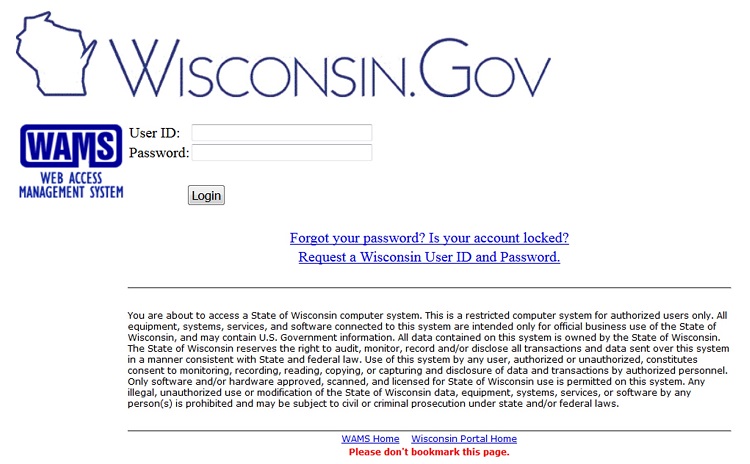
Once the self-registration is submitted, the information will be reviewed and an email will be sent to the email account that was provided for the self-registration. The user should open the email (the user should check his or her spam folder if it is not in the Inbox). The user should then click on the link in the email and enter the WAMS User ID and password created during self-registration. This will activate the user’s WAMS account to be able to log into ACCESS.
A user should activate the WAMS account immediately; the account may become locked if it is not activated within a certain amount of time.
Users (including Security and Location Administrators) will need to enter their WAMS User ID and password every time they log into ACCESS.
12.3.2.3 Setting Up a User Account in APP
After logging into WAMS, the User Account Setup page will appear if the individual does not already have a user account in APP. He or she must fill in the requested information on the next screen, including:
Section 1 - User Information
- Fill in: first name, middle initial, last name, date of birth, email address, street address, city, state, zip, and phone.
- Check the agreement box.
- Under “Please select the type of user that you are,” there are five options to choose from:
- I am the designated security administrator for an organization that is certified for Express Enrollment.
- I am a regular user for an organization that is certified for Express Enrollment.
- I have previously registered an agency as a Community Access Point and will serve as the Security Administrator for that organization.
- I am a regular user for a Community Access Point.
- I would like to register my agency as a Community Access Point.
Users who plan to submit applications for Express Enrollment should check the box that says "I am a regular user for an organization that is certified for Express Enrollment." If the user is a security administrator, he or she should check the box that says "I am the designated security administrator for an organization that is certified for Express Enrollment." Refer to Section 12.3.1.1.1 Responsibilities of the Security Administrator for more information about security administrators.
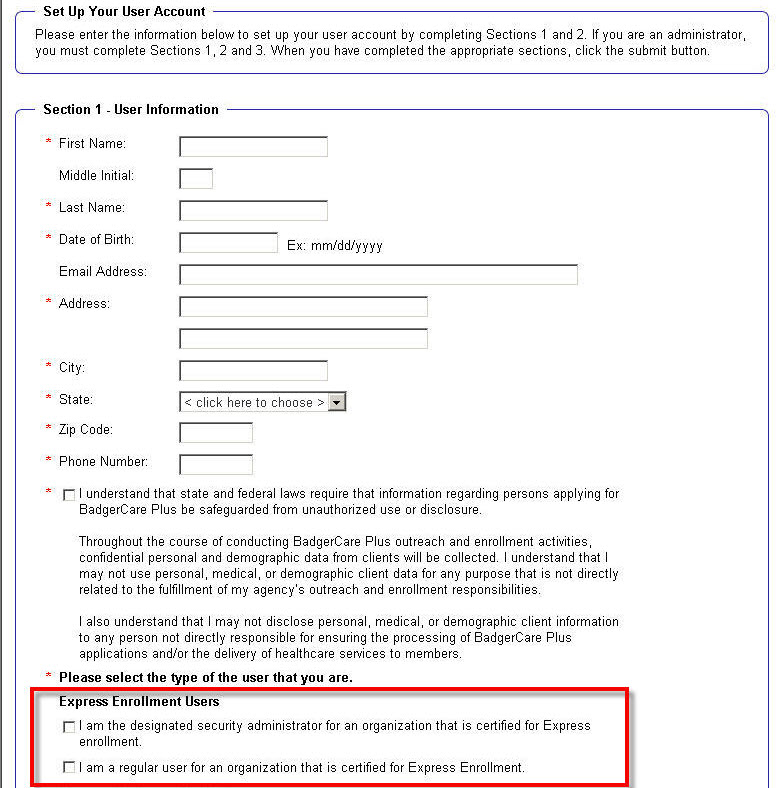
If one of the first two options under the Express Enrollment Users section is selected, Section 2 - Express Enrollment Organization Information will display.
Security Administrators
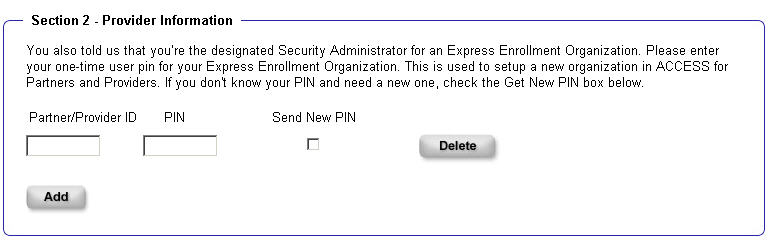
If the individual indicated that he or she is a security administrator, he or she must enter the Partner or Provider ID for the organization and the PIN. The Partner or Provider ID is the number in the approval letter from ForwardHealth that identifies the organization as approved to use the Express Enrollment tool. The approval letter is sent to the Express Enrollment contact person. The PIN is the one-time use number that was emailed to the Express Enrollment contact person after the organization was enrolled as an Express Enrollment partner, provider, or qualified hospital. See Section 12.3.1.1.1 Responsibilities of the Security Administrator for more information about the approval letter and PIN).
If the Express Enrollment contact person has forgotten or misplaced the Express Enrollment PIN, a new one may be requested by checking the Send New PIN box. The system will email the replacement PIN to the email address originally specified by the organization at the time of application for certification.
| Note: |
The replacement PIN is sent to the email address specified at the time of application for certification which may not be the email address of the person who requested the replacement PIN by checking the Send New PIN box. The organization should coordinate internally to make sure that the replacement PIN is shared with the appropriate people in the organization. If the organization did not include an email address when enrolling as an Express Enrollment partner, provider, or qualified hospital through the ForwardHealth Portal or if the email address provided has since changed, the security administrator should submit the correct email address via the Express Enrollment Change Request available on the ForwardHealth Portal. Otherwise, the Express Enrollment contact person may not receive the PIN email, or the email may not go to the correct person. |
Once the security administrator has entered the appropriate PIN, he or she may click Add to enter additional organizations if needed. This is allowed because an individual may serve as security administrator for more than one organization. The Add button only needs to be clicked if the security administrator wants to add more rows. When finished, the security administrator should click Submit, which activates the organization in APP and gives the security administrator access to begin user setup for his or her organization.
Regular Users
If the individual indicated that he or she is a regular user, he or she must enter the Partner or Provider ID for the organization. This is the number in the approval letter from ForwardHealth that identifies the organization as approved to use the Express Enrollment tool.
A user may be associated with more than one organization but rarely more than two. Due to this, there is only one box for the Partner/Provider ID, with the option to add more if necessary. If a user wants to add more than one Partner/Provider ID, he or she must click Add after entering each Partner/Provider ID. Once the user clicks Add, the Partner/Provider organization name and the security administrator name(s) on file for this Partner/Provider organization will display.
| Note: | Users will not automatically have access to make presumptive eligibility determinations and temporarily enroll individuals in BadgerCare Plus through the Express Enrollment process for their organizations. After setting up an account, users must wait for the security administrator to grant them rights to do so. |
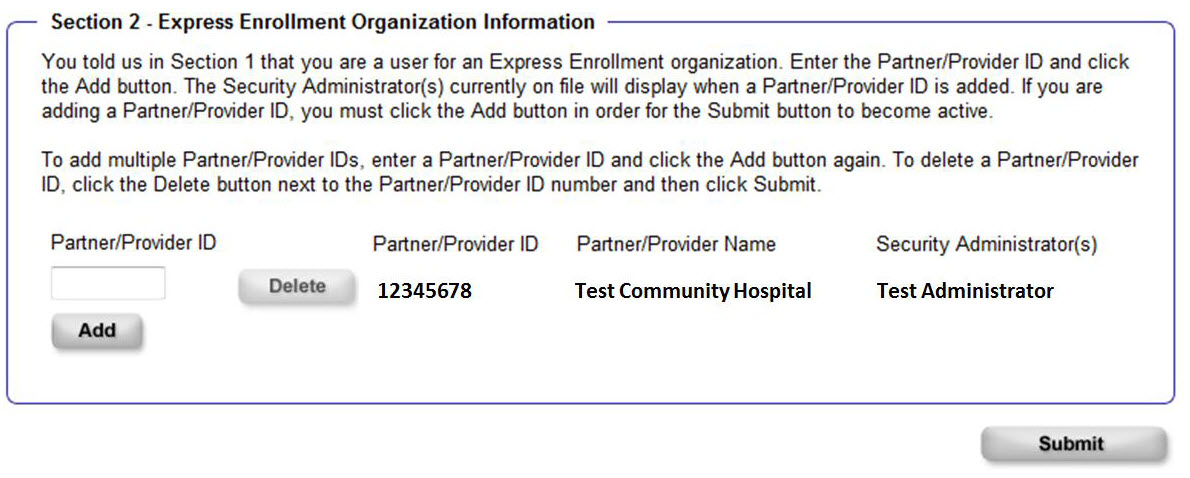
Once a user fills out the information and clicks Submit, he or she will see the following screen. The user must contact the organization’s security administrator to receive further access to make presumptive eligibility determinations.
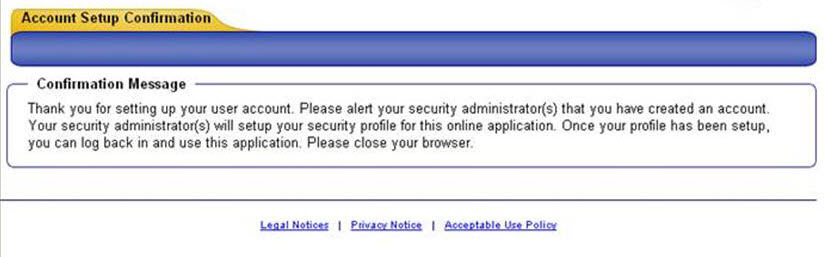
If a user no longer wants to submit Express Enrollment applications for a Partner/Provider organization, he or she must click Delete next to that Partner/Provider organization and then click Submit.
12.3.2.4 Granting Permissions to Users
After a user has set up his or her account, the security administrator must grant the user permission to use the Express Enrollment tool for specific populations. To do this, the security administrator should:
- Choose Search for users from my organization on the ACCESS Landing Page.
- Under Search Criteria, enter the user’s information and click Next.
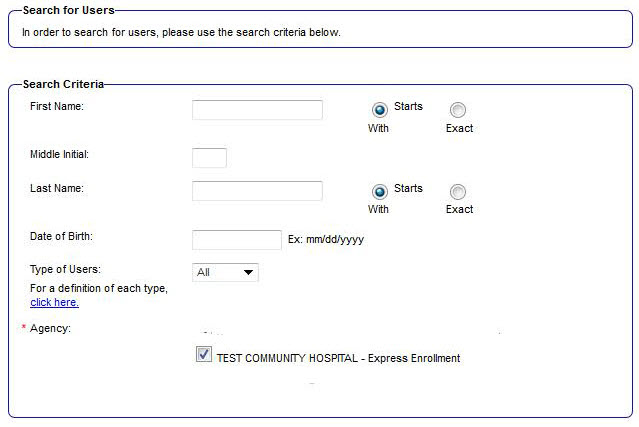
- Select the user’s name from the Search Results and click Go.
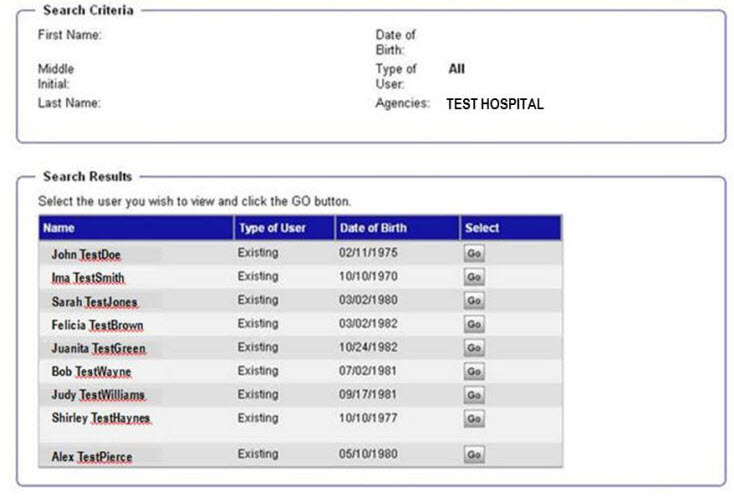
- After selecting a user, a User Details page will display. This page allows the security administrator to:
- Remove a user.
- Activate account rights and access to populations:
- View: User may view Express Enrollment applications onl
- View/Enter/Submit: Users may view, enter, and submit Express Enrollment applications
- No Access: User has no privileges for that location. When new Express Enrollment locations are added, all access options for that location will be defaulted to No Access for all users who are set up under the organization. In addition, when a Security or Location Administrator logs into a user’s account for the first time, all access options for that user will be defaulted to No Access.
Note: The security administrator will only be able to set up rights for that individual user, giving him or her the ability to perform Express Enrollment for specific populations for whom the organization is certified to make presumptive eligibility determinations (as a partner, provider, or qualified hospital). 
| Note: | The security administrator for an organization will only be able to see the populations for which his or her organization was certified by ForwardHealth to make presumptive eligibility determinations. Partners will only see Children. Providers will see Children, Pregnant Women, and Family Planning Only Services. Qualified hospitals will see all populations. |
This page last updated in Release Number: 24-03
Release Date: 11/15/2024
Effective Date: 11/15/2024